For users to reliably access resources both on campus and remotely, well-formed library links are key. This article will showcase how to include links to HSLS resources in a syllabus, presentation, Canvas/instructional site, or citation.
What Are Durable URLs?
A durable link/URL, permalink, or persistent link is a stable, direct link to a specific resource or document. Using durable links helps ensure that users can consistently access materials over time.
Example: https://link.springer.com/book/10.1007/978-1-0716-2441-8
Non-durable links might consist of “canned” results from a search query, may not be static, and may be temporary. One example would be a link resulting from a Google search:
A DOI can also work as a durable link when HSLS subscribes to the resource. For example:
https://doi.org/10.1007/978-1-0716-2441-8
Links from PittCat
The PittCat library catalog allows users to link directly to resource access points. Linking to a catalog citation can be particularly helpful when directing users to print resources or a journal that has multiple access points.
 To link to an item in PittCat, select the permalink icon under the “Send To” options.
Example of a PittCat link: https://pitt.primo.exlibrisgroup.com/permalink/01PITT_INST/vl5dkg/alma99101220123806236
Links from HSLS Resource Pages
When linking to a database, journal, or e-book, users can copy the properly formatted URL directly from the HSLS website’s resources pages.
To do this, right-click or long-press (on mobile devices) the resource link and select “Copy link address” or “Copy.”
Free vs. Paid Access
Some HSLS resources are freely available without a log-in, while others require IP-authentication because they are something HSLS pays to subscribe to.
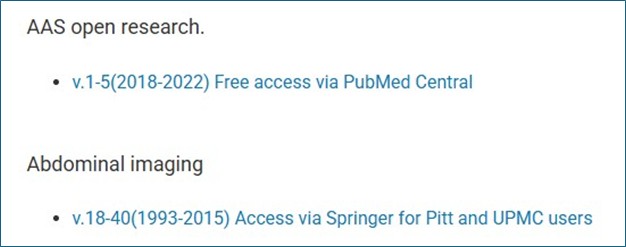
For example, AAS Open Research is labeled “Free access,” indicating free availability. Abdominal Imaging includes a note stating access is limited to users with Pitt and UPMC credentials:
Access notes are also displayed in PittCat records. For example, Nature’s note indicates the journal is subscription access, provided only to Pitt and UPMC users:

EZproxy Links
Subscription-based resources require an EZproxy link prefix (https://pitt.idm.oclc.org/login?url=) so remote users can access the content and have their IP address be recognized as Pitt-affiliated.
This link routes users through a proxy server to access the e-book, Gene Therapy of Cancer:
https://pitt.idm.oclc.org/login?url=https://link.springer.com/book/10.1007/978-1-0716-2441-8
The EZproxy prefix can also be used with a DOI, if Pitt subscribes to the content:
https://pitt.idm.oclc.org/login?url=https://doi.org/10.1007/978-1-0716-2441-8
Links copied directly from the HSLS website already include the EZproxy prefix. Please note that free resources don’t require the EZproxy prefix and may not function correctly if added.
Test Links
Finally, always test any links being distributed to confirm they work properly. It can help to replicate user experience by testing links off campus or using a browser where you are not already logged into Pitt Passport.
If you have any questions or difficulty linking to an HSLS resource, please contact HSLS Ask a Librarian.
~Ann Passmore